分类 编程语言 下的文章

利用PHP对文件进行下载:

  public function download(){
       $file = './public/Uploads/fileuri';   //下载文件存放目录  
       if (file_exists($file)) {
           header('Content-Description: File Transfer');
           header('Content-Type: application/octet-stream');
           header('Content-Disposition: attachment; filename="'.basename($file).'"');
           header('Expires: 0');
           header('Cache-Control: must-revalidate');
           header('Pragma: public');
           header('Content-Length: ' . filesize($file));
           readfile($file);
           exit;
       }else{
           echo "文件不存在";
       }

   }

  1. 首先在项目模块下的Common文件夹内建立function.php文件,这样就可以首先执行这里的函数了。所以在这里判断是否是移动端访问的,判断方法如下:

     function ismobile() {
    // 如果有HTTP_X_WAP_PROFILE则一定是移动设备
    if (isset ($_SERVER['HTTP_X_WAP_PROFILE']))
        return true;
    
    //此条摘自TPM智能切换模板引擎,适合TPM开发
    if(isset ($_SERVER['HTTP_CLIENT']) &&'PhoneClient'==$_SERVER['HTTP_CLIENT'])
        return true;
    //如果via信息含有wap则一定是移动设备,部分服务商会屏蔽该信息
    if (isset ($_SERVER['HTTP_VIA']))
        //找不到为flase,否则为true
        return stristr($_SERVER['HTTP_VIA'], 'wap') ? true : false;
    //判断手机发送的客户端标志,兼容性有待提高
    if (isset ($_SERVER['HTTP_USER_AGENT'])) {
        $clientkeywords = array(
            'nokia','sony','ericsson','mot','samsung','htc','sgh','lg','sharp','sie-','philips','panasonic','alcatel','lenovo','iphone','ipod','blackberry','meizu','android','netfront','symbian','ucweb','windowsce','palm','operamini','operamobi','openwave','nexusone','cldc','midp','wap','mobile'
        );
        //从HTTP_USER_AGENT中查找手机浏览器的关键字
        if (preg_match("/(" . implode('|', $clientkeywords) . ")/i", strtolower($_SERVER['HTTP_USER_AGENT']))) {
            return true;
        }
    }
    //协议法,因为有可能不准确,放到最后判断
    if (isset ($_SERVER['HTTP_ACCEPT'])) {
        // 如果只支持wml并且不支持html那一定是移动设备
        // 如果支持wml和html但是wml在html之前则是移动设备
        if ((strpos($_SERVER['HTTP_ACCEPT'], 'vnd.wap.wml') !== false) && (strpos($_SERVER['HTTP_ACCEPT'], 'text/html') === false || (strpos($_SERVER['HTTP_ACCEPT'], 'vnd.wap.wml') < strpos($_SERVER['HTTP_ACCEPT'], 'text/html')))) {
            return true;
        }
    }
    return false;
    }
    
  2. 然后再建议一个公共的控制器,里面继承一个公共的控制器,里面设置一个前置方法,判断如果是移动端的就直接显示移动端的主题,然后建立一个主题文件夹Mobile,里面放主题文件。

    class PublicController extends Controller{
    public function _initialize(){
         if (ismobile()) {
            //设置默认默认主题为 Mobile
            C('DEFAULT_V_LAYER','Mobile');
        }
     }
     }
  3. 只需要在使用模板的地方继承公共的控制器就可以了。

     class IndexController extends PublicController {
    public function index(){
         $this->display();
    }
     }

  1. 引入依赖包

    import Geolocation from 'Geolocation';
  2. 调用方法

    //获取经纬度的方法 
    getLongitudeAndLatitude = () => {
        //获取位置
        return new Promise(() => {
    
            Geolocation.getCurrentPosition(
                location => {
                    //可以获取到的数据
                    var result = "速度:" + location.coords.speed +
                        "\n经度:" + location.coords.longitude +
                        "\n纬度:" + location.coords.latitude +
                        "\n准确度:" + location.coords.accuracy +
                        "\n行进方向:" + location.coords.heading +
                        "\n海拔:" + location.coords.altitude +
                        "\n海拔准确度:" + location.coords.altitudeAccuracy +
                        "\n时间戳:" + location.timestamp;
                    console.log(result);
                },
                error => {
                    console.log("失败")
                }
            );
        })
    }

1.在componentWillMount

 componentWillMount() {
        this.backHandler && this.backHandler.remove();
    }

2.在componentDidMount

componentDidMount() {
    this.backHandler = BackHandler.addEventListener('hardwareBackPress',
        this.onBackButtonPressAndroid);
}

3.退出函数

  onBackButtonPressAndroid = () => {
        if (this.props.navigation.isFocused()) {
            if (this.lastBackPressed && this.lastBackPressed + 2000 >= Date.now()) {
                //最近2秒内按过back键,可以退出应用。
                return false;
            }
            this.lastBackPressed = Date.now();
            NRJCore.toast("再按一次退出");
            return true;
        }

    }

获取当前时间戳

time();

时间戳转换成时间

date(format,timestamp)

参数:
format 必需。规定时间戳的格式。
timestamp 可选。规定时间戳。默认是当前时间和日期。
timestamp的参数

  • Y :年(四位数)
  • m : 月(两位数,首位不足补0)
  • d :日(两位数,首位不足补0)
  • H:小时,带有首位零的 24 小时小时格式
  • h :小时,带有首位零的 12 小时小时格式
  • i :带有首位零的分钟
  • s :带有首位零的秒(00 -59)
  • a:小写的午前和午后(am 或 pm)

日期转时间戳

strtotime

获取带有毫秒的时间戳

PHP默认是不带有直接获取带有毫秒的时间戳的,我们只能转换成粗略的带有毫秒的时间戳。

 function getMillisecond(){
        list($s1,$s2)=explode(' ',microtime());
        return (float)sprintf('%.0f',(floatval($s1)+floatval($s2))*1000);
    }

Vue-Cli3.0没有了config文件夹,默认也没有配置文件,这些都是需要我们手动进行建立的,首先我们需要在项目根目录里面建议一个vue.config.js的文件,名字必须是vue.config.js。然后在这个js文件里面进行配置,小编在下面简单介绍几个常用的配置,以及写法:

module.exports={
    baseUrl:'/',//根路径
    outputDir:'dist',//构建输出目录
    assetsDir:'assets',//静态资源目录
    lintOnSave:false,//是否开启eslint保存检测,有效值:true || false || 'error'
    devServer:{
        open:true,//是否自动打开页面
        host:"127.0.0.1",//主机名(真机测试0.0.0.0)
        port:8081,//端口号
        https:false,//是否开启https
        hotOnly: false,//热更新
        proxyL:{
            //配置跨域
            '/api':{
                target:'http://localhost:5000/api',
                ws:true,
                changeOrigin:true,
                pathRewrite:{
                    '^/api':''
                }
            }
        },
        before(app){
            //在服务内部所有中间件之前执行的印个内容
            app.get('/api',(req,res)=>{
                res.json();
            })
        }
    }
}

在微信的开发过程中,小编发现,无论你打几个空格,他都只显示一个空格。
下面下边介绍几种空格的方式:

  1. 一个空格的话,直接敲击一个空格就行了。
  2. 使用\t和自己敲空格是一样的,还是只显示一个空格。
  3. 下面说的是在<text decode="{{true}}"> </text>包裹中的空格方式:

    • &ensp; 空格的距离是半个中文字符。
    • &emsp;空格的距离是一个中文字符。
    • &nbsp;也是空格。

换行可以使用 \n

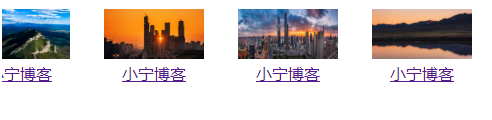
使用javascript实现的无缝滚动(跑马灯),小编在这里简单描述一下:内容一直滚动,鼠标经过的时候滚动就会暂停。
效果示例图:

1.png

实现代码如下:

<!DOCTYPE html>
<html lang="en">
 <head> 
  <meta charset="UTF-8" /> 
  <title>无缝滚动</title> 
  <style>
    img{
      width: 100px;
      height: 50px;
    }
    #demo{
      overflow: hidden; 
      width: 735px; 
      height: 165px
    }
    table{

    }
  </style>
 </head> 
 <body> 
  <div id="demo" class="hdo gd_img"> 
   <table cellpadding="0" align="left" border="0" cellspace="0"> 
    <tbody> 
     <tr> 
      <td id="demo1" valign="top"> 
       <table cellspacing="0" cellpadding="4" width="2150" border="0" id="tupian"> 
        <tbody> 
         <tr> 
          <td align="middle"><a class="a1" href="http://www.sunxiaoning.com"><img src="img/1.jpg" /><br />小宁博客</a></td> 
          <td align="middle"><a class="a1" href="http://www.sunxiaoning.com"><img src="img/2.jpg" /><br />小宁博客</a></td> 
          <td align="middle"><a class="a1" href="http://www.sunxiaoning.com"><img src="img/3.jpg" /><br />小宁博客</a></td> 
          <td align="middle"><a class="a1" href="http://www.sunxiaoning.com"><img src="img/4.jpg" /><br />小宁博客</a></td> 
          <td align="middle"><a class="a1" href="http://www.sunxiaoning.com"><img src="img/1.jpg" /><br />小宁博客</a></td> 
          <td align="middle"><a class="a1" href="http://www.sunxiaoning.com"><img src="img/2.jpg" /><br />小宁博客</a></td> 
          <td align="middle"><a class="a1" href="http://www.sunxiaoning.com"><img src="img/3.jpg" /><br />小宁博客</a></td> 
          <td align="middle"><a class="a1" href="http://www.sunxiaoning.com"><img src="img/4.jpg" /><br />小宁博客</a></td> 
          <td align="middle"><a class="a1" href="http://www.sunxiaoning.com"><img src="img/1.jpg" /><br />小宁博客</a></td> 
          <td align="middle"><a class="a1" href="http://www.sunxiaoning.com"><img src="img/2.jpg" /><br />小宁博客</a></td> 
          <td align="middle"><a class="a1" href="http://www.sunxiaoning.com"><img src="img/3.jpg" /><br />小宁博客</a></td> 
          <td align="middle"><a class="a1" href="http://www.sunxiaoning.com"><img src="img/4.jpg" /><br />小宁博客</a></td> 
          <td align="middle"><a class="a1" href="http://www.sunxiaoning.com"><img src="img/1.jpg" /><br />小宁博客</a></td> 
          <td align="middle"><a class="a1" href="http://www.sunxiaoning.com"><img src="img/2.jpg" /><br />小宁博客</a></td> 
          <td align="middle"><a class="a1" href="http://www.sunxiaoning.com"><img src="img/3.jpg" /><br />小宁博客</a></td> 
          <td align="middle"><a class="a1" href="http://www.sunxiaoning.com"><img src="img/4.jpg" /><br />小宁博客</a></td> 
         </tr>
        </tbody>
       </table></td> 
      <td id="demo2" valign="top"></td>
     </tr>
    </tbody>
   </table>
  </div> 
  <script>
      var speed1=25//速度数值越大速度越慢
      document.getElementById("demo2").innerHTML=document.getElementById("demo1").innerHTML
      function Marquee1(){
          if(document.getElementById("demo2").offsetWidth-document.getElementById("demo").scrollLeft<=0)
            document.getElementById("demo").scrollLeft-=document.getElementById("demo1").offsetWidth
          else{
            document.getElementById("demo").scrollLeft++
             }
          }
          var MyMar1=setInterval(Marquee1,speed1)
          document.getElementById("demo").onmouseover=function () {clearInterval(MyMar1)}
          document.getElementById("demo").onmouseout=function () {MyMar1=setInterval(Marquee1,speed1)}
  </script>  
 </body>
</html>

小编今天打开编辑器运行RN项目的时候,突然显示module hmrclient is not a registered,刷新之后,出现链接服务器错误类似的提示,好奇怪,小编电脑这边服务明明已经起来了,但是就是不能使用。真奇怪,小编在这时候突然想起来昨天给模拟器试着连上了无线网,会不会是这个原因呢,小编就重新给模拟器连接上无线网,还真的可以了,总结一下,出现这种问题的解决办法之一就是:给模拟器连接上无线网,就是让它能够访问你的服务。

第一步:安装react-native-swiper

npm i react-native-swiper –save 

第二步:导入react-native-swiper

import Swiper from ‘react-native-swiper’;

第三步:使用

  <Swiper
       style={styles.swiper}
       height={200}
       horizontal={true}
       paginationStyle={{bottom: 10}}
       autoplay={true}
       autoplayTimeout={3}
       showsButtons={false}>
       <Image source={require('../../images/login_logo1.png')} style={styles.img}/>
       <Image source={require('../../images/login_logo2.png')} style={styles.img}/>
       <Image source={require('../../images/login_logo3.png')} style={styles.img}/>
  </Swiper>

样式:

 img: {
       height: 200,
       width:600,
   },
   swiper:{
       height: 300,
   },

小提示:Swiper外面加一个View。
常见的属性和方法请参考:https://github.com/leecade/react-native-swiper